---
title: Cloud Foundry上で実行したSpring BatchアプリのMetricsをPrometheus Pushgatewayに送る
tags: ["Java", "Spring", "Spring Batch", "Spring Boot", "Cloud Foundry", "Pivotal Web Services", "PAS", "Micrometer", "Prometheus"]
categories: ["Programming", "Java", "org", "springframework", "batch"]
date: 2019-08-28T17:15:30Z
updated: 2019-08-29T07:00:09Z
---
[Spring BatchをCloud Foundry上で実行する際のTips](/entries/475)の続き。
Batchのメトリクス([Micrometer](https://micrometer.io))をPrometheusに送る場合は[Pushgateway](https://prometheus.io/docs/instrumenting/pushing/)を使うのが定石です。
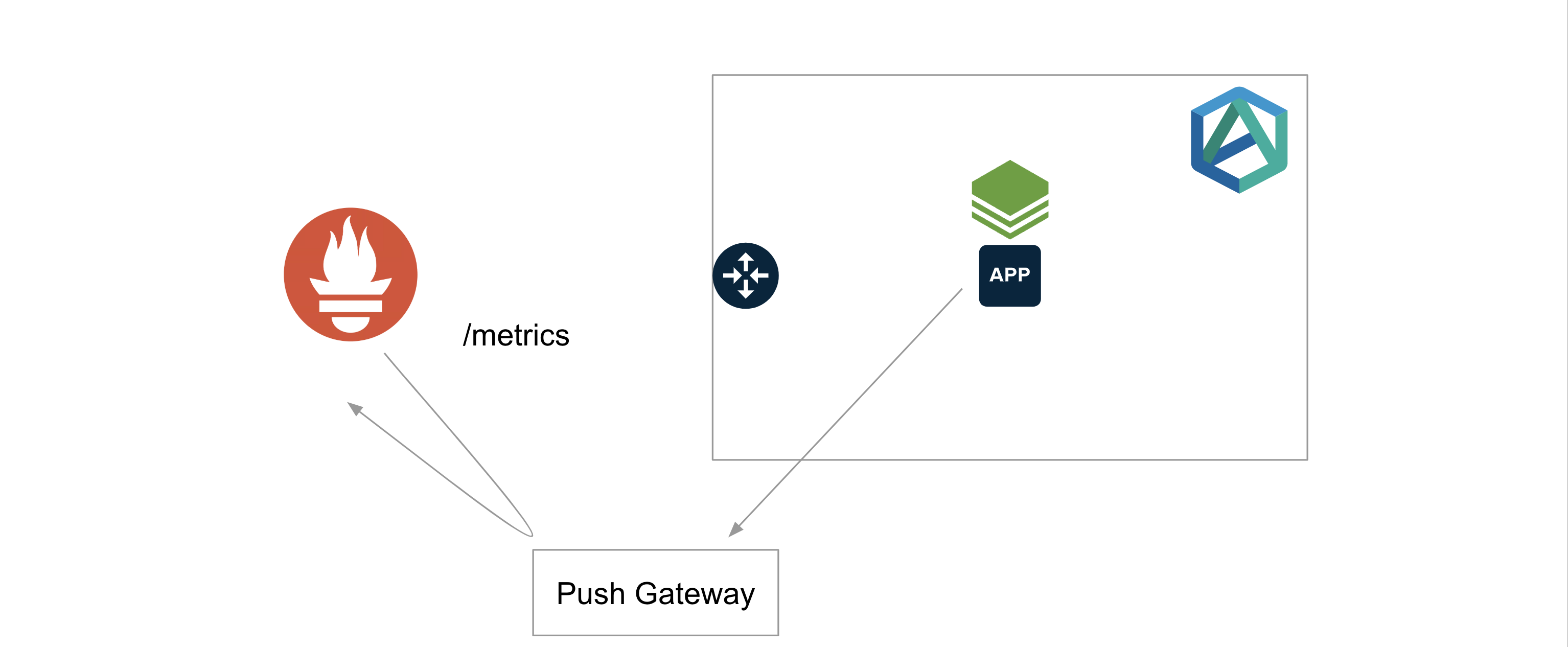
ただし、[公式ドキュメント](https://prometheus.io/docs/practices/pushing/)にいくつか注意点が書いてあるので気をつけてください。
Spring Boot Actuatorを使っている場合、PushgatewayはMicrometer経由で送れます。[Document](https://docs.spring.io/spring-boot/docs/2.2.0.BUILD-SNAPSHOT/reference/html/production-ready-features.html#production-ready-metrics-export-prometheus)。
> Spring Batch 4.2でSpring Batch用のMicrometerメトリクスが自動で導入されます。[Document](https://docs.spring.io/spring-batch/4.2.x/reference/html/whatsnew.html#whatsNewMetrics)。
> Pushgatewayを使う以外の方法としては、[こちらの記事](/entries/498)で紹介したMetric Registrarの[Structured Log Format](https://docs.pivotal.io/pivotalcf/2-6/metric-registrar/using.html#register-log-format)を使うこともできます。
**目次**
### アプリケーション側の設定
依存ライブラリの追加とプロパティの追加で済みます。
`pom.xml`に次の設定を追加。
```xml
org.springframework.boot
spring-boot-starter-actuator
io.micrometer
micrometer-registry-prometheus
io.prometheus
simpleclient_pushgateway
```
`application.properties`に次の設定を追加
```properties
management.metrics.distribution.percentiles-histogram.spring.batch=true
# Common Tags
management.metrics.tags.org_name=${cloud.application.organization_name:demo}
management.metrics.tags.space_name=${cloud.application.space_name:demo}
management.metrics.tags.app_name=${cloud.application.application_name:demo}
management.metrics.tags.cf_instance_id=${cloud.application.application_id:demo}:${CF_INSTANCE_INTERNAL_IP:0}
management.metrics.tags.cf_instance_number=${cloud.application.instance_index:0}
# Push Gateway
management.metrics.export.prometheus.pushgateway.enabled=true
management.metrics.export.prometheus.pushgateway.grouping-key.app_name=${management.metrics.tags.app_name}
management.metrics.export.prometheus.pushgateway.push-rate=10s
management.metrics.export.prometheus.pushgateway.job=demo-batch
management.metrics.export.prometheus.pushgateway.shutdown-operation=push
```
PushgatewayのURLは`management.metrics.export.prometheus.pushgateway.base-url`で指定でき、デフォルトは`http://localhost:9091`です。
> Spring Boot 2.1系では`:`形式しかサポートしておらず、HTTPSにしたい場合は、[このような設定](https://github.com/mminella/Batch-In-2019/blob/e918d811e7b5bd3872235652b137c37b203b286c/batch-job/src/main/java/io/spring/batch/configuration/PrometheusConfiguration.java#L43-L56)が必要です。Spring 2.2では`https://: pushgateway.yml
kubectl create ns pushgateway
kubectl -n pushgateway apply -f pushgateway.yml
```
Helm ChartではPersistent Volumeは使用されていません。
### PrometheusのScrape Config
PrometheusのScrape Configに次の設定を追加。
```yaml
- job_name: pushgateway
scrape_interval: 30s
scrape_timeout: 10s
metrics_path: /metrics
scheme: https # or http
static_configs:
- targets:
- :
```
### サンプルBatchアプリのデプロイ
```
git clone https://github.com/making/demo-batch-micrometer.git
cd demo-batch-micrometer
./mvnw clean package -DskipTests=true
# MySQLサービスの作成 (PWSの例)
cf create-service cleardb spark batch-db
# PushgatewayのUser Provided Service
cf create-user-provided-service pushgateway -p '{"url":"https://your-pushgateway.example.com"}'
cf push
```
### サンプルBatchアプリの実行
```
cf run-task demo-batch-micrometer "$(cf curl /v2/apps/$(cf app demo-batch-micrometer --guid) | jq -r .entity.detected_start_command) --spring.batch.job.enabled=true"
```
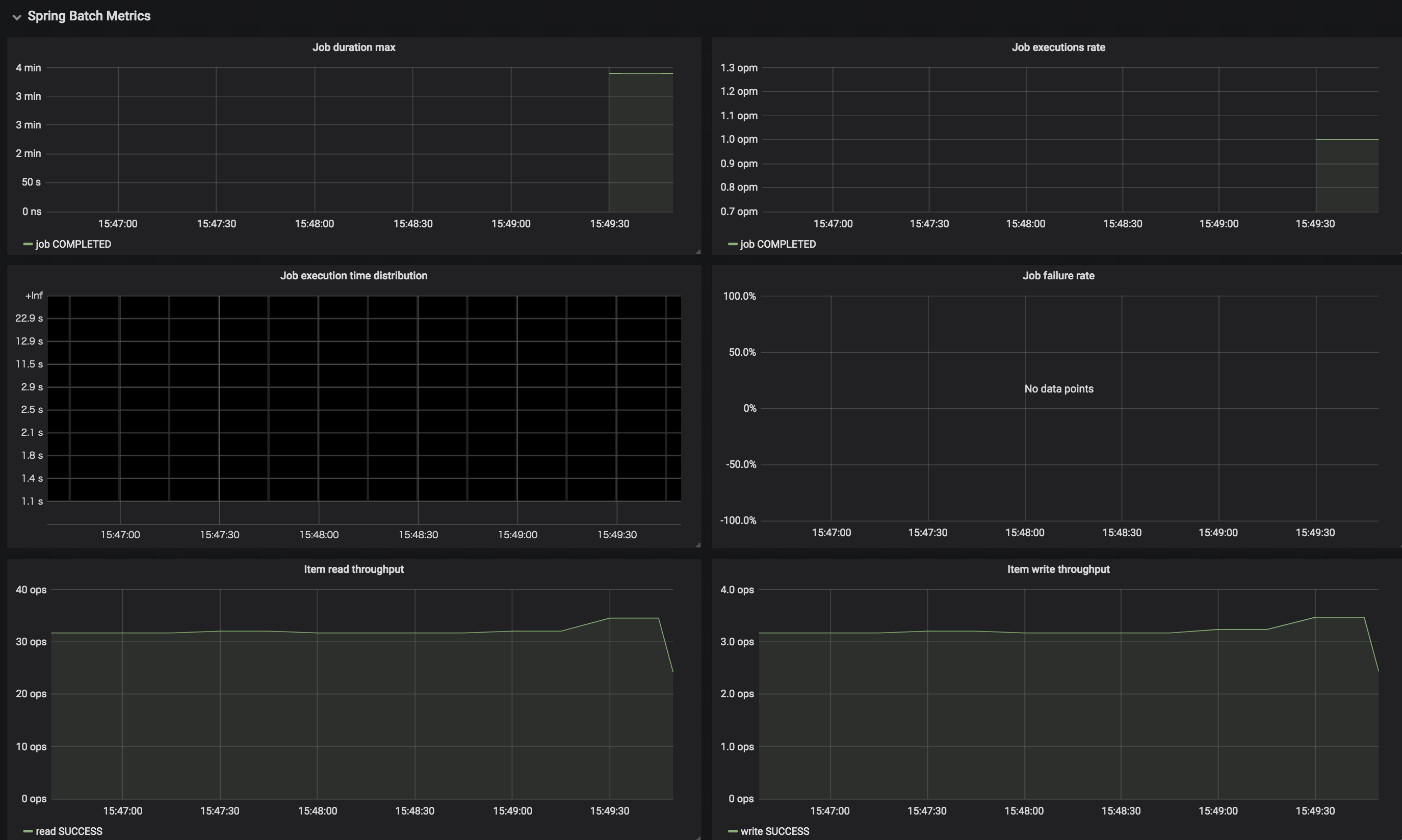
[この記事](/entries/498)で紹介したGrafanaダッシュボードで見ると、下のような結果が得られました。

`/metrics`にアクセスすれば次のようなSpring Batchのメトリクスも確認できました。
```
# HELP spring_batch_chunk_write_seconds Chunk writing duration
# TYPE spring_batch_chunk_write_seconds summary
spring_batch_chunk_write_seconds_sum{app_name="demo-batch-micrometer",cf_instance_id="0434b678-ba31-494b-adee-66a409a5f88f:0",cf_instance_number="0",instance="",job="demo-batch",job_name="job",org_name="APJ",space_name="development",status="SUCCESS",step_name="step"} 702.973811496
spring_batch_chunk_write_seconds_count{app_name="demo-batch-micrometer",cf_instance_id="0434b678-ba31-494b-adee-66a409a5f88f:0",cf_instance_number="0",instance="",job="demo-batch",job_name="job",org_name="APJ",space_name="development",status="SUCCESS",step_name="step"} 702
# HELP spring_batch_chunk_write_seconds_max Chunk writing duration
# TYPE spring_batch_chunk_write_seconds_max gauge
spring_batch_chunk_write_seconds_max{app_name="demo-batch-micrometer",cf_instance_id="0434b678-ba31-494b-adee-66a409a5f88f:0",cf_instance_number="0",instance="",job="demo-batch",job_name="job",org_name="APJ",space_name="development",status="SUCCESS",step_name="step"} 1.007325871
# HELP spring_batch_item_process_seconds Item processing duration
# TYPE spring_batch_item_process_seconds summary
spring_batch_item_process_seconds_sum{app_name="demo-batch-micrometer",cf_instance_id="0434b678-ba31-494b-adee-66a409a5f88f:0",cf_instance_number="0",instance="",job="demo-batch",job_name="job",org_name="APJ",space_name="development",status="SUCCESS",step_name="step"} 0.064980584
spring_batch_item_process_seconds_count{app_name="demo-batch-micrometer",cf_instance_id="0434b678-ba31-494b-adee-66a409a5f88f:0",cf_instance_number="0",instance="",job="demo-batch",job_name="job",org_name="APJ",space_name="development",status="SUCCESS",step_name="step"} 7020
# HELP spring_batch_item_process_seconds_max Item processing duration
# TYPE spring_batch_item_process_seconds_max gauge
spring_batch_item_process_seconds_max{app_name="demo-batch-micrometer",cf_instance_id="0434b678-ba31-494b-adee-66a409a5f88f:0",cf_instance_number="0",instance="",job="demo-batch",job_name="job",org_name="APJ",space_name="development",status="SUCCESS",step_name="step"} 3.1383e-05
# HELP spring_batch_item_read_seconds Item reading duration
# TYPE spring_batch_item_read_seconds summary
spring_batch_item_read_seconds_sum{app_name="demo-batch-micrometer",cf_instance_id="0434b678-ba31-494b-adee-66a409a5f88f:0",cf_instance_number="0",instance="",job="demo-batch",job_name="job",org_name="APJ",space_name="development",status="SUCCESS",step_name="step"} 0.459303902
spring_batch_item_read_seconds_count{app_name="demo-batch-micrometer",cf_instance_id="0434b678-ba31-494b-adee-66a409a5f88f:0",cf_instance_number="0",instance="",job="demo-batch",job_name="job",org_name="APJ",space_name="development",status="SUCCESS",step_name="step"} 7020
# HELP spring_batch_item_read_seconds_max Item reading duration
# TYPE spring_batch_item_read_seconds_max gauge
spring_batch_item_read_seconds_max{app_name="demo-batch-micrometer",cf_instance_id="0434b678-ba31-494b-adee-66a409a5f88f:0",cf_instance_number="0",instance="",job="demo-batch",job_name="job",org_name="APJ",space_name="development",status="SUCCESS",step_name="step"} 0.005539393
# TYPE spring_batch_job_active_seconds_active_count untyped
spring_batch_job_active_seconds_active_count{app_name="demo-batch-micrometer",cf_instance_id="0434b678-ba31-494b-adee-66a409a5f88f:0",cf_instance_number="0",instance="",job="demo-batch",org_name="APJ",space_name="development"} 0
# TYPE spring_batch_job_active_seconds_duration_sum untyped
spring_batch_job_active_seconds_duration_sum{app_name="demo-batch-micrometer",cf_instance_id="0434b678-ba31-494b-adee-66a409a5f88f:0",cf_instance_number="0",instance="",job="demo-batch",org_name="APJ",space_name="development"} 0
# HELP spring_batch_job_seconds Job duration
# TYPE spring_batch_job_seconds summary
spring_batch_job_seconds_sum{app_name="demo-batch-micrometer",cf_instance_id="0434b678-ba31-494b-adee-66a409a5f88f:0",cf_instance_number="0",instance="",job="demo-batch",name="job",org_name="APJ",space_name="development",status="FAILED"} 714.804265133
spring_batch_job_seconds_count{app_name="demo-batch-micrometer",cf_instance_id="0434b678-ba31-494b-adee-66a409a5f88f:0",cf_instance_number="0",instance="",job="demo-batch",name="job",org_name="APJ",space_name="development",status="FAILED"} 1
# HELP spring_batch_job_seconds_max Job duration
# TYPE spring_batch_job_seconds_max gauge
spring_batch_job_seconds_max{app_name="demo-batch-micrometer",cf_instance_id="0434b678-ba31-494b-adee-66a409a5f88f:0",cf_instance_number="0",instance="",job="demo-batch",name="job",org_name="APJ",space_name="development",status="FAILED"} 714.804265133
# HELP spring_batch_step_seconds Step duration
# TYPE spring_batch_step_seconds summary
spring_batch_step_seconds_sum{app_name="demo-batch-micrometer",cf_instance_id="0434b678-ba31-494b-adee-66a409a5f88f:0",cf_instance_number="0",instance="",job="demo-batch",job_name="job",name="step",org_name="APJ",space_name="development",status="FAILED"} 714.691804289
spring_batch_step_seconds_count{app_name="demo-batch-micrometer",cf_instance_id="0434b678-ba31-494b-adee-66a409a5f88f:0",cf_instance_number="0",instance="",job="demo-batch",job_name="job",name="step",org_name="APJ",space_name="development",status="FAILED"} 1
# HELP spring_batch_step_seconds_max Step duration
# TYPE spring_batch_step_seconds_max gauge
spring_batch_step_seconds_max{app_name="demo-batch-micrometer",cf_instance_id="0434b678-ba31-494b-adee-66a409a5f88f:0",cf_instance_number="0",instance="",job="demo-batch",job_name="job",name="step",org_name="APJ",space_name="development",status="FAILED"} 714.691804289
```
[こちら](https://github.com/making/demo-batch-micrometer/raw/master/dashboard/spring-batch.json)のダッシュボードを使って↓のように視覚化できます。
> ClearDBの`spark`プランでこのジョブを実行するとクエリ実行回数制限により、`org.springframework.transaction.CannotCreateTransactionException: Could not open JDBC Connection for transaction; nested exception is java.sql.SQLSyntaxErrorException: (conn=167352018) User 'xxxxxxxxxx' has exceeded the 'max_questions' resource (current value: 3600)`のエラーが出て途中で失敗します。
Pushgatewayを使うとジョブが終わってもメトリクスは明示的に削除しない限り残り続けることに気をつけてください。
`management.metrics.export.prometheus.pushgateway.shutdown-operation=delete`にすると終了時にメトリクスを削除できます。最後にメトリクスを`push`したいか`delete`したいかは方針次第。