---
title: STSでSpringMVC+SpringDataJPA+HibernateなPre-Configuredテンプレートプロジェクトをクイックスタート! jsug
tags: []
categories: ["Programming", "Java", "org", "springframework", "AdventCalendar", "2012"]
date: 2012-11-30T19:38:07Z
updated: 2012-11-30T20:00:26Z
---
この記事は[Spring Framework Advent Calendar 2012][1]の一日目の記事です。
SpringMVCやSpringDataを使って開発する際、最初の開発プロジェクト構築が面倒くさい。
pom.xmlにあれこれ設定して、各種設定ファイルにお決まりの設定をして、、
STSにはSpringMVCの雛形プロジェクトを作成できるが、あれで作成される内容は不十分。。結局自分でカスタマイズする必要があり、結構時間がかかる。
自分はこういう作業をskipするためによくテンプレートプロジェクトを作成して、コピーして使っていた。maven-archetypeでもいいのだが若干面倒くさい。
SpringToolSuite3からは実はテンプレートプロジェクトをカスタマイズする機能が追加されているので、普段使っているテンプレートプロジェクトをSTS対応させてみた。
### 前提条件
* STS 3+ http://www.springsource.org/downloads/sts-ggts
(spring-tool-suite-3.1.0.RELEASE-e3.8-macosx-cocoa-x86_64で検証)
### カスタムテンプレートプロジェクトの設定
"Preferences" -> "Spring" -> "Template Projects"にいって"add"をクリック.
名前に"custom-template"(何でもOK)、URLに"https://github.com/making/spring-webapp-template/raw/master/template/descriptors.xml"を設定。
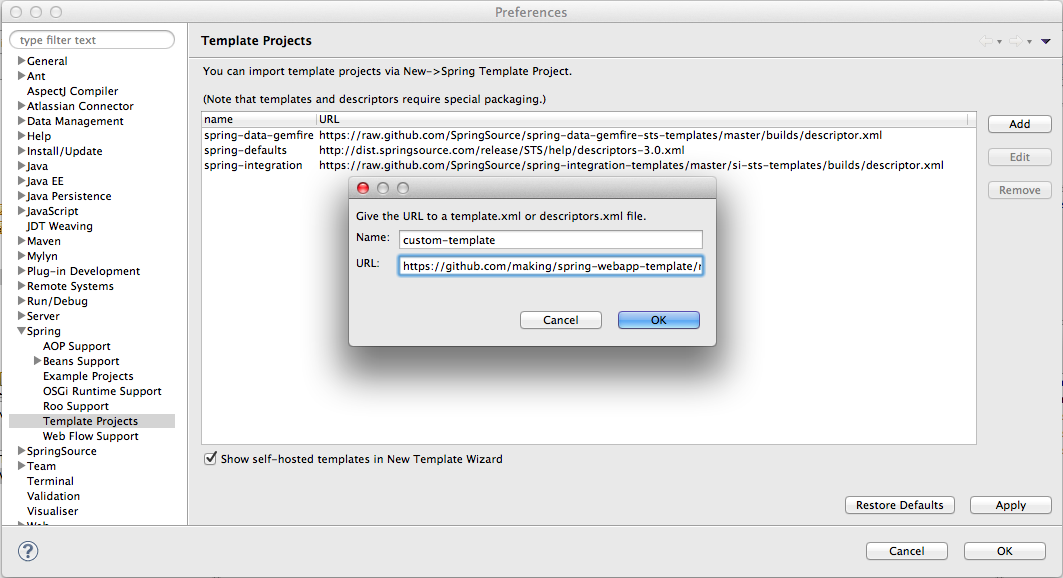 "OK"をクリック
### テンプレートプロジェクトを作成する
"File" -> "New" -> "Spring Template Project"に行って"Spring Web Application Template Project"を選択(新しく追加されている!).
"OK"をクリック
### テンプレートプロジェクトを作成する
"File" -> "New" -> "Spring Template Project"に行って"Spring Web Application Template Project"を選択(新しく追加されている!).
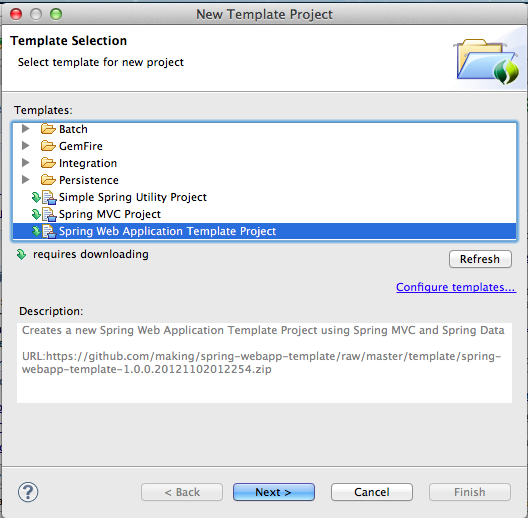 "Next"をクリック. 初回はテンプレートプロジェクトをダウンロードする。
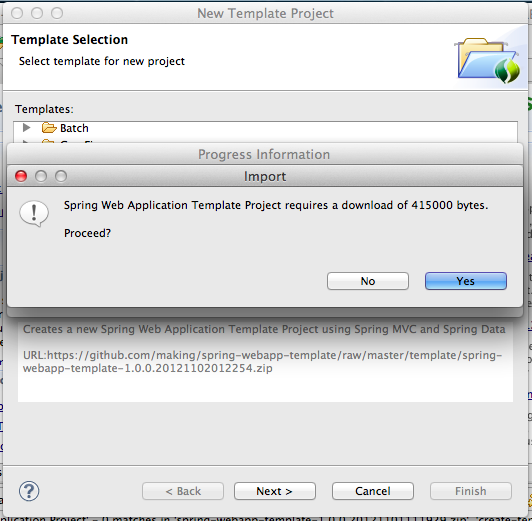 "Yes"をクリック.
プロジェクト情報を入力して"Finish"をクリック.
"Yes"をクリック.
プロジェクト情報を入力して"Finish"をクリック.
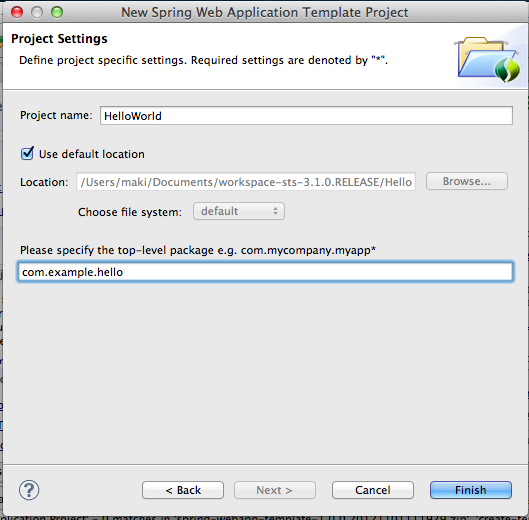 テンプレートプロジェクトがworkspaceに出来上がる.
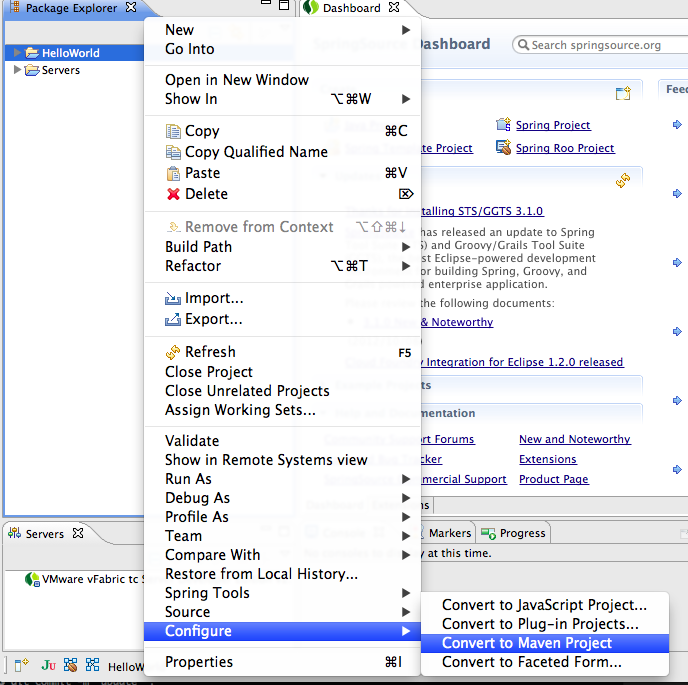
プロジェクトを右クリックして"Configure" -> "Convert to Maven Project"を選択.
テンプレートプロジェクトがworkspaceに出来上がる.
プロジェクトを右クリックして"Configure" -> "Convert to Maven Project"を選択.
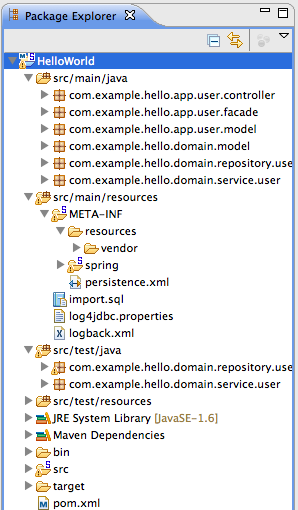
 Mavenプロジェクトとして出来上がる。
 ### アプリケーションの起動
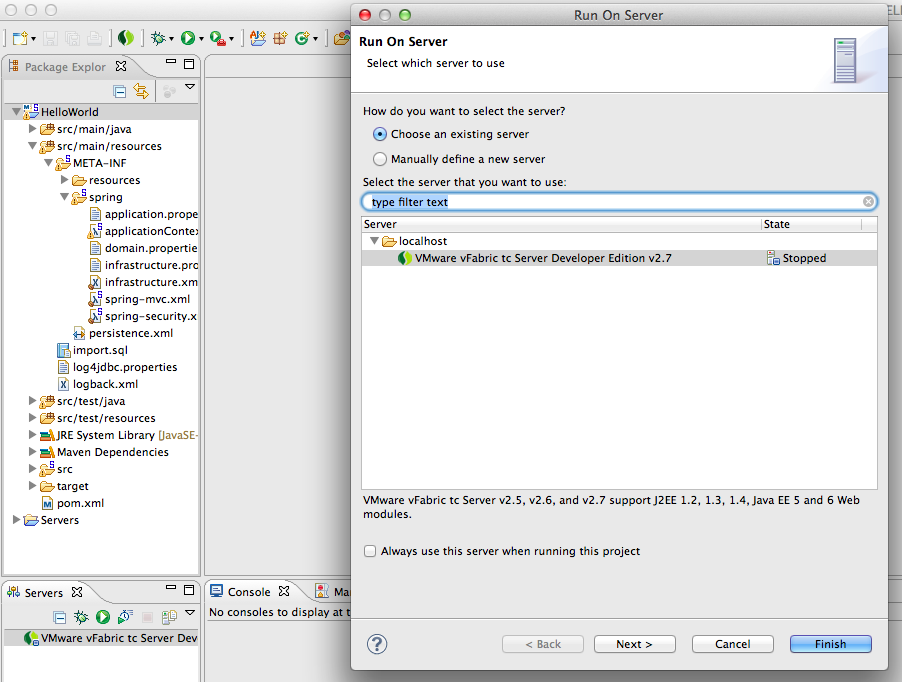
プロジェクトを右クリックして "Run As" -> "Run on Server"を選択.
"VMware vFabric tc Server Developer Edition vx.x"を選択して"Finish"をクリック.
### アプリケーションの起動
プロジェクトを右クリックして "Run As" -> "Run on Server"を選択.
"VMware vFabric tc Server Developer Edition vx.x"を選択して"Finish"をクリック.
 次のように出力される.
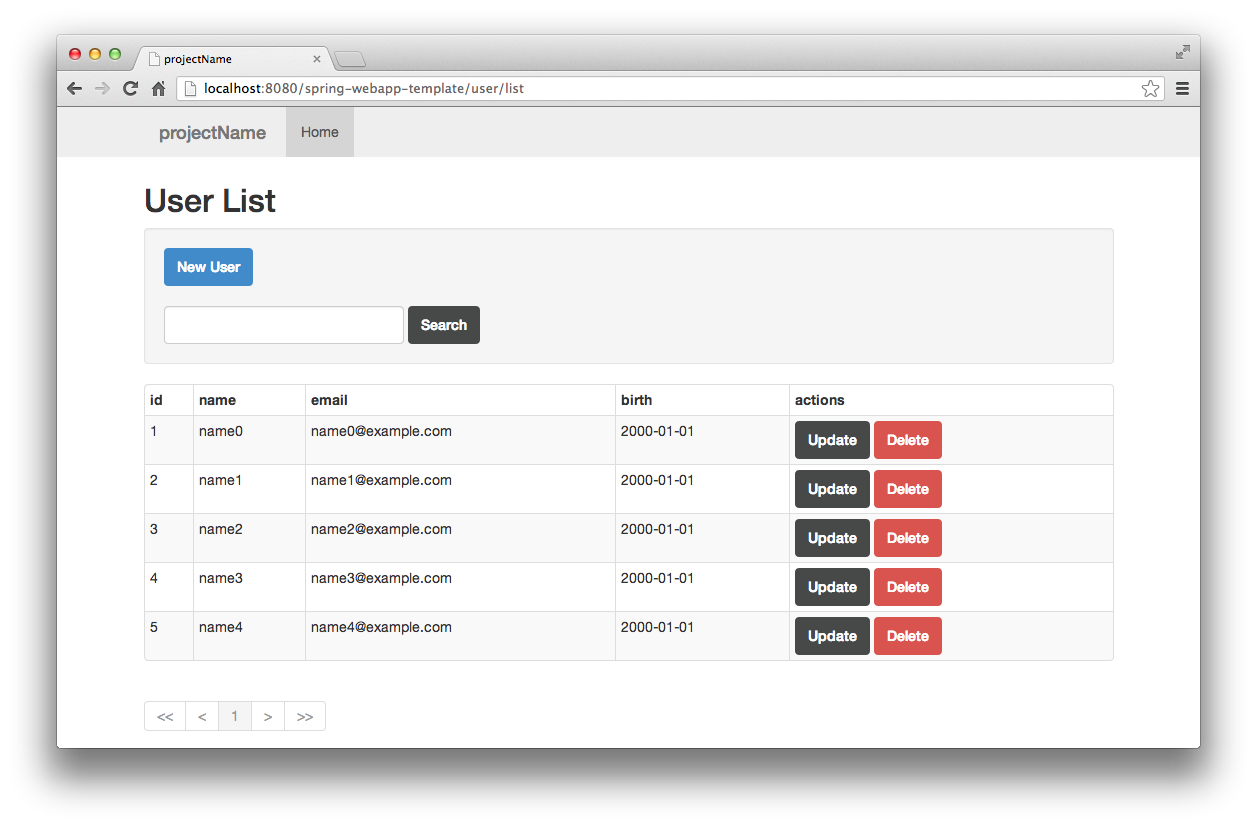 簡単にプロジェクトを作成してスタートできた。
次回はこのテンプレートプロジェクトのプロジェクト構成を簡単に説明しよう。
### トラブルシューティング
あるあるのはまりポイント
#### Cannot create JDBC driver
##### 問題
00:50:18 [tomcat-http--4] [DEBUG] [o.h.e.transaction.spi.AbstractTransactionImpl ] - begin
Cannot create JDBC driver of class 'net.sf.log4jdbc.DriverSpy' for connect URL 'jdbc:log4jdbc:h2:mem:projectName;MODE=PostgreSQL'
java.sql.SQLException: No suitable driver
が発生する。APサーバー(tomcat)が JDBCドライバを見つけられていない. デフォルトでH2が設定されている.
##### 解
JDBCドライバをAPサーバー(tomcat)のlibに置く。
cp $HOME/.m2/repository/com/h2database/h2/x.x.x/h2-x.x.x.jar $STS_HOME/vfabric-tc-server-developer-x.x.x.RELEASE/tomcat-x.x.x.RELEASE/lib/
#### Out of memory: PermGen space
##### 問題
java.lang.OutOfMemoryError: PermGen space
が発生して起動しない。
##### 解
Permサイズを大きくする。JVMオプションに `-XX:PermSize=256m`.
jarが多いのでTomcatのデフォルト値だとPermサイズが足りない。
tc serverを使う場合は最初から設定されている。
2日目は[@mike_neck][10]さん、よろ!
[1]: http://atnd.org/events/34294
[2]: https://raw.github.com/making/spring-webapp-template/master/wiki/images/screen01.png
[3]: https://raw.github.com/making/spring-webapp-template/master/wiki/images/screen02.png
[4]: https://raw.github.com/making/spring-webapp-template/master/wiki/images/screen03.png
[5]: https://raw.github.com/making/spring-webapp-template/master/wiki/images/screen04.png
[6]: https://raw.github.com/making/spring-webapp-template/master/wiki/images/screen05.png
[7]: https://raw.github.com/making/spring-webapp-template/master/wiki/images/screen06.png
[8]: https://raw.github.com/making/spring-webapp-template/master/wiki/images/screen07.png
[9]: https://raw.github.com/making/spring-webapp-template/master/wiki/images/screen08.png
[10]: http://twitter.com/mike_neck
簡単にプロジェクトを作成してスタートできた。
次回はこのテンプレートプロジェクトのプロジェクト構成を簡単に説明しよう。
### トラブルシューティング
あるあるのはまりポイント
#### Cannot create JDBC driver
##### 問題
00:50:18 [tomcat-http--4] [DEBUG] [o.h.e.transaction.spi.AbstractTransactionImpl ] - begin
Cannot create JDBC driver of class 'net.sf.log4jdbc.DriverSpy' for connect URL 'jdbc:log4jdbc:h2:mem:projectName;MODE=PostgreSQL'
java.sql.SQLException: No suitable driver
が発生する。APサーバー(tomcat)が JDBCドライバを見つけられていない. デフォルトでH2が設定されている.
##### 解
JDBCドライバをAPサーバー(tomcat)のlibに置く。
cp $HOME/.m2/repository/com/h2database/h2/x.x.x/h2-x.x.x.jar $STS_HOME/vfabric-tc-server-developer-x.x.x.RELEASE/tomcat-x.x.x.RELEASE/lib/
#### Out of memory: PermGen space
##### 問題
java.lang.OutOfMemoryError: PermGen space
が発生して起動しない。
##### 解
Permサイズを大きくする。JVMオプションに `-XX:PermSize=256m`.
jarが多いのでTomcatのデフォルト値だとPermサイズが足りない。
tc serverを使う場合は最初から設定されている。
2日目は[@mike_neck][10]さん、よろ!
[1]: http://atnd.org/events/34294
[2]: https://raw.github.com/making/spring-webapp-template/master/wiki/images/screen01.png
[3]: https://raw.github.com/making/spring-webapp-template/master/wiki/images/screen02.png
[4]: https://raw.github.com/making/spring-webapp-template/master/wiki/images/screen03.png
[5]: https://raw.github.com/making/spring-webapp-template/master/wiki/images/screen04.png
[6]: https://raw.github.com/making/spring-webapp-template/master/wiki/images/screen05.png
[7]: https://raw.github.com/making/spring-webapp-template/master/wiki/images/screen06.png
[8]: https://raw.github.com/making/spring-webapp-template/master/wiki/images/screen07.png
[9]: https://raw.github.com/making/spring-webapp-template/master/wiki/images/screen08.png
[10]: http://twitter.com/mike_neck